LightX AI Photo Editor Retouch
- 4.2
- Rating
- 50.00M
- Installs
- Free
- Price

 Analysis by App-foxy
When I want to turn an ordinary phone photo into something ready to share, I usually need more than a filter. I may need to clean up a distracting object, soften a portrait, remove a background, or give an image a completely different mood. LightX AI Photo Editor Retouch is built around that kind of practical editing rather than simple one-tap decoration. It brings retouching, background work, filters, and general photo adjustments into one mobile workspace, which makes it appealing when I want to finish an image without moving between several apps.
My first impression is that LightX sits between a casual social editor and a more involved creative tool. It is approachable enough for quick edits, but its range means I can also use it for a small product image, a profile picture, a poster-style composition, or a before-and-after experiment. The app is free to install, although some functions and creative resources are connected to in-app purchases ranging from $0.99 to $59.99 per item. That makes the initial download easy to try, but I would still explore the free workflow before committing to anything paid.
Starting with a photo and deciding what it needs
The most useful way to approach LightX is to begin with a clear editing goal. If I open it without knowing whether I am correcting a portrait, isolating a subject, or building a stylized image, the number of options can feel slightly scattered. Once I decide what the photo needs, the app becomes easier to navigate. A portrait may call for retouching and a subtle filter, while a marketplace image may benefit more from background removal and careful cropping.
You May Also Like

 Blood Strike: 2.5 Anniversary
Blood Strike’s Loadouts Turn Every Drop Into a Tactical Gamble
A close look at Blood Strike’s custom loadouts: how fast access to signature weapons reshapes its battle royale rhythm, rewards preparation, and narrows the gap between fights.

 Pandora - Music & Podcasts
Pandora’s Music Is Easy to Start, but Harder to Recover
Pandora’s strength is its low-effort path from a seed to a station. Its weak spot is how much confidence it asks you to place in connection, setup, and quiet recovery.

 8 Ball Pool
 Is Built on Rivalries, Rematches, and Routine
A close look at the rivalries, rematches, shared routines, and unanswered safety questions that turn a quick pool match into a persistent mobile community.

 Samsung Music
’s Quiet Strength Is Playing What You Already Own
Its reach comes less from spectacle than from dependable access to a personal library. That simplicity is both the app’s strongest retention engine and its ceiling.

 AccuWeather: Weather Radar
AccuWeather Review: A Quick, Clear Forecast for Everyday Decisions
For everyday plans, the best forecast is the one you can understand quickly. AccuWeather makes rain timing, radar, and local conditions easy to act on, with a few trade-offs.

 Hill Climb Racing
Why Hill Climb Racing Still Turns Crashes Into One More Run
A tiny car, a bumpy hill and one more upgrade: Hill Climb Racing keeps resurfacing because its simple chaos makes every near-miss feel personal.
More From Our News Desk
View All News


That flexibility is one of the app’s strongest qualities. Many basic photo editors are organized around filters, so the creative process starts and ends with choosing a mood. LightX gives me more control over the image’s structure. I can think about the subject, the background, the lighting, and the final use separately instead of applying a preset and hoping it solves everything.
I find this especially useful for images that are almost good but not quite ready. A photo taken in a busy room can become more useful when the subject is separated from the surroundings. A casual headshot can look cleaner after small corrections rather than a heavy beauty effect. A travel image can gain personality from color treatment without losing the details that make the location recognizable.
The app is developed by AndOr Communications Pvt Ltd and is listed in the photography category. Its Everyone age rating makes it suitable for a broad audience, including people who simply want to improve family photos or prepare images for social platforms. It runs on Android 8.0 and newer, so compatibility should be comfortable for many Android users, though the experience will still depend on the phone’s screen, speed, and available storage.
Choosing the right starting material
LightX rewards a little preparation. I get better results when I choose a reasonably sharp original instead of trying to rescue a tiny, compressed image. This matters most for retouching and background work: unclear edges give the editor less visual information to work with, and the final result can look artificial no matter how carefully I adjust it.
A useful habit is to duplicate the original before experimenting. That lets me try a bold filter, a background change, or a stronger retouch without worrying that I have lost the natural version. I also prefer to decide where the final image will be used before editing. A profile image, a vertical story post, and a product listing each need different framing, so editing without that destination in mind can create extra work later.
One detail I appreciate is that LightX can serve both a quick-edit user and someone who wants to build a more deliberate visual result. I can make a small correction in a few moments, but I can also spend time comparing different treatments. The trade-off is that the broader toolkit requires judgment. It does not automatically know whether a face should remain natural, whether a background should look realistic, or whether a filter has gone too far.
Building the edit: retouching, backgrounds, and visual style
The retouching side is most useful when I treat it as correction rather than replacement. Small adjustments can help a portrait look more polished while preserving the person’s character. If I push every smoothing or enhancement option aggressively, the result can lose texture and start to look like a plastic mask. My preferred workflow is to make a change, look at the entire image, and then reduce the effect until it supports the photo instead of becoming the main subject.
That restraint is important because mobile displays can hide problems while I am editing. A face may look smooth and attractive at the editing size but lose natural detail when viewed larger. I recommend checking the eyes, hairline, skin texture, and edges around the face before considering a portrait finished. LightX makes experimentation easy, but the responsibility for a believable result remains with the user.
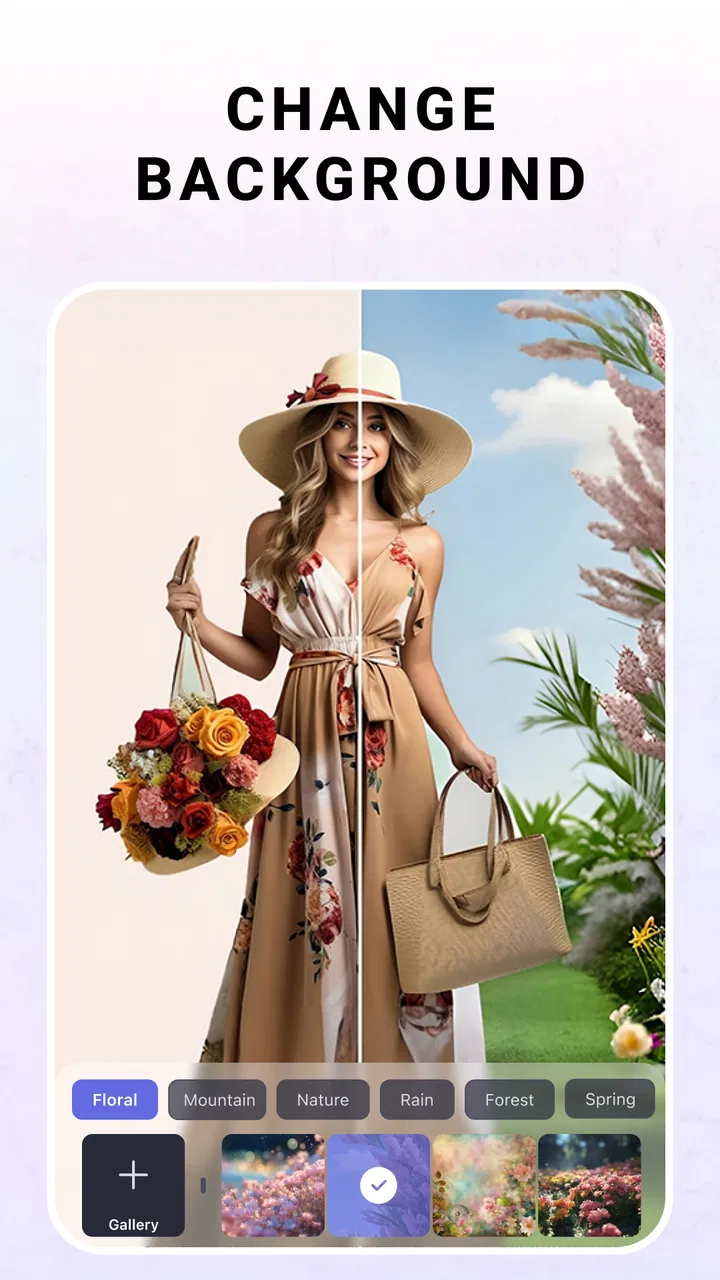
Background removal is another area where the app can save time. I find it useful for turning a casual object photo into a cleaner presentation, isolating a person for a creative composition, or preparing a subject for a different visual setting. The best candidates have clear separation between foreground and background. Hair, transparent objects, branches, and low-contrast clothing are more demanding because their edges are difficult to distinguish from what surrounds them.
My practical tip is to inspect the outline before adding a new background. If the cutout already has rough edges, placing it over a bright or highly detailed scene will make the problem obvious. A plain background can hide minor imperfections while I refine the composition. This is a small step, but it often makes the difference between an edit that feels intentional and one that looks pasted together.
A realistic everyday workflow
Imagine I have taken a quick photo of a handmade item near a window and want to publish it online. I would start by choosing the clearest frame, crop away empty space, and use the background tools to separate the item from a cluttered table. I would then place it against a simple setting, make modest color corrections, and inspect the edges at the corners and around small details. Before sharing, I would compare the finished version with the original to make sure the item still looks truthful.
This workflow shows where LightX is more useful than a filter-only editor. The goal is not merely to make the picture brighter; it is to change how the image communicates. The same approach works for a profile image, where I might clean the background and make a restrained portrait adjustment, or for an event announcement, where isolating a person can help create a more focused layout.
At the same time, I would not use strong background replacement to misrepresent a product or create a misleading image. Editing tools are most effective when they improve presentation without changing the important facts of the subject. For professional work, I would keep the original file and treat the edited image as a presentation version rather than the only copy.
Filters work best after the structure is settled
LightX includes AI filters and broader visual effects, but I prefer to apply them after the composition and main corrections are complete. A filter can make an image feel more cohesive, yet it can also disguise problems that are easier to fix before styling. If the subject is poorly framed or the background is distracting, changing the color mood will not solve the underlying issue.
I usually compare a filtered version with a lightly edited version instead of assuming the more dramatic result is better. This is particularly important for skin tones, food, and product photos. A strong effect may look exciting in a feed but become unsuitable when the image needs to remain accurate. LightX gives room for expressive edits, but it is not a substitute for deciding what the image should communicate.
A less obvious advantage of this order is that it makes iteration faster. Once the subject is cleanly framed and the unwanted distractions are handled, I can test several styles without repeating the structural work. I can also return to a simpler treatment if the creative direction changes. That separation between correction and style is one of the most useful habits I developed while using the app.
Iterating without losing the original idea
Creative editing rarely works perfectly on the first attempt. I often need to compare a natural portrait with a more polished version, or test a plain background against a colorful one. LightX is well suited to this exploratory stage because its tools encourage trying different treatments within the same app. The danger is not a lack of options; it is spending too much time making changes that do not serve the final purpose.
I recommend making one significant change at a time. If I retouch the face, replace the background, increase contrast, and add a strong filter in one pass, it becomes difficult to know which choice improved the image and which one weakened it. A slower sequence gives me a clearer sense of cause and effect. It also makes it easier to recreate the result later if I need a second image with a similar look.
For portraits, I pay attention to consistency. If I am editing several images from the same occasion, I try to keep the level of smoothing, color, and background treatment similar. A single image can look attractive on its own while a group feels mismatched. LightX is convenient for individual edits, but maintaining a consistent visual language still requires manual attention from me.
For social content, I also think about how the image will appear beside other posts. A dramatic AI filter may be interesting as a one-off, but a simpler treatment can be more flexible if I am building a recognizable style. The app gives me enough creative range to experiment, yet I would avoid treating every available effect as something that needs to be used.
Where the app can feel less comfortable
The main friction comes from having many creative directions available in one place. A beginner may understand what a background remover does but still wonder whether to edit the background first, retouch the subject, or apply a filter. The solution is to work from the largest visual problem to the smallest: composition, background, subject corrections, then style.
Another limitation is that automated tools are not equally convincing on every image. A clearly separated subject is easier than fine hair against a similar-colored wall. Retouching can also become unnatural when the user expects the app to make every detail perfect automatically. I see LightX as an assistant for editing decisions, not a replacement for checking the image carefully.
Users who need a full desktop-style production environment may find the mobile format restrictive. I would choose a more specialized tool when I need precise, repeatable control over complex layers, extensive typography, or a long professional workflow. LightX is more attractive when speed, accessibility, and a broad set of visual adjustments matter more than exhaustive control.
There is also a practical purchasing consideration. The app is free, but optional items cost between $0.99 and $59.99 each. I would not assume that every creative option belongs to the free experience, and I would check the purchase prompt before confirming anything. For occasional edits, the free starting point may be enough; frequent creators should decide whether the paid additions genuinely save time in their particular workflow.
Preparing the finished image for sharing
The final stage is where I judge whether an edit is actually useful. A good-looking image inside an editor is not automatically ready for delivery. I check the crop, the subject’s position, the background edges, and whether the visual style fits the place where I plan to publish it. This is especially important after removing a background, because an isolated subject may need more breathing room than it had in the original photo.
I also compare the final image at normal viewing size rather than judging only while zoomed in. Zooming helps find rough edges, but it can make minor imperfections feel more important than they are. Normal viewing tells me whether the overall image communicates clearly. If the edit only looks impressive when enlarged, I usually simplify it.
For a handoff to another person, I would explain what was changed and keep the unedited original available. That is useful when a client, friend, or colleague wants a different crop or a less intense effect. LightX is effective as the place where I create the visual version, but a clean handoff still depends on file organization and communication outside the editor.
One of the app’s practical strengths is that it can take an image from correction to a more finished creative treatment without requiring a separate filter application. That reduces interruptions in a short workflow. The compromise is that I need to remain aware of the intended output, because a visually dramatic edit may not be appropriate for every publishing context.
Who should use it and who should look elsewhere
I would recommend LightX to someone who wants more than basic brightness and crop controls but does not want to learn a complicated desktop editor. It is a good fit for social creators, casual portrait editors, small sellers preparing product images, and anyone who enjoys testing different visual directions on a phone. It is also useful for people who regularly need background changes and want those tools beside retouching and filters.
I would be more cautious about recommending it to someone who only wants a very simple one-tap enhancement. The broader toolkit may feel unnecessary if the goal is merely to brighten a photo and share it immediately. I would also point professional designers toward a more specialized environment when they need exact layer management, detailed masking, or highly repeatable brand production.
LightX is not automatically the best alternative to every editor. A dedicated portrait app may offer a more focused beauty workflow, while a specialized design application may be better for text-heavy layouts. A standard gallery editor may be quicker for basic corrections. LightX earns its place when I need a middle ground: more creative control than the built-in tools, but less complexity than a full professional suite.
My creator verdict after using the full workflow
LightX is a capable photography app for turning a rough phone image into a more deliberate piece of visual content. I like that it combines face retouching, background removal, AI filters, and general creative editing instead of forcing me to switch tools for every stage. Its best results come from a thoughtful sequence: choose a strong original, solve composition and background problems, make restrained corrections, then add style.
The app has reached over 50 million installs and holds an average rating of 4.2 from around 502 thousand ratings, which reflects broad interest rather than guaranteeing that every workflow will suit every person. I see the appeal clearly: LightX is approachable, versatile, and useful for everyday image-making. Its current version is 2.5.10, and the free entry point makes it reasonable to test the editing experience before considering optional purchases.
My honest recommendation is to try it if your creative work often begins with a photo but ends with something more polished, isolated, or stylized. Keep your edits moderate, inspect difficult edges, and save the original before experimenting. If you need only basic corrections, another simpler editor may be faster. If you need deep professional control, a desktop-oriented tool may be a better handoff. For the space between those extremes, LightX AI Photo Editor Retouch is a practical and flexible choice, especially when I want to move from a quick idea to a shareable image without leaving my phone.
FAQs for LightX AI Photo Editor Retouch
01What is LightX AI Photo Editor Retouch used for?
LightX AI Photo Editor Retouch is a mobile editing app designed for enhancing, retouching, and creatively transforming photos. It includes tools for removing unwanted objects, smoothing skin, adjusting colors, changing backgrounds, applying filters, creating collages, and using AI-powered effects. It can be useful for casual edits, social media posts, profile pictures, and more detailed creative projects.
02Does LightX AI Photo Editor Retouch offer AI-powered editing features?
Yes, the app includes several AI-based tools intended to simplify common editing tasks and produce creative results. Depending on the version and platform, these may include AI effects, background changes, object removal, image enhancement, portrait retouching, and style transformations. Results can vary according to the original image, lighting, and complexity, so some edits may still require manual adjustments.
03Is LightX AI Photo Editor Retouch free to download and use?
LightX AI Photo Editor Retouch can generally be downloaded for free, but access to all features may require in-app purchases or a premium subscription. Basic editing tools may be available without payment, while advanced AI effects, premium templates, export options, or an ad-free experience can be restricted. Before subscribing, users should check the current pricing and trial conditions in the app store.
04Can beginners use LightX AI Photo Editor Retouch easily?
The app is suitable for beginners because its main tools are organized around familiar editing tasks, and many effects can be applied with only a few taps. Automatic adjustments and AI features reduce the need for advanced editing knowledge. However, users may need some practice to understand layers, blending, masking, or more precise retouching controls when creating complex compositions.
05Does LightX AI Photo Editor Retouch reduce photo quality when saving or sharing images?
LightX generally allows edited images to be saved and shared directly from the app, but the final quality may depend on the selected export settings, the original resolution, and whether a particular feature applies compression. Users who need high-quality results for printing or professional use should review the available resolution and format options before exporting, especially when using premium editing tools.
Pros
- AI tools quickly remove objects and enhance portraits.
- Large selection of filters
- effects
- stickers
- and creative overlays.
- Layer-based editing offers more control for advanced compositions.
- Background replacement works well for social media images.
- Supports detailed adjustments for color
- lighting
- and image sharpness.
Cons
- Many premium tools and effects require a paid subscription.
- AI results can look unnatural with complex backgrounds or hair.
- The interface may feel crowded for first-time photo editors.
- High-resolution exports can be slow on older phones.
- Some features require an internet connection to process images.

LightX AI Photo Editor Retouch
Gallery